
SAML Transformation Fallback Workaround (Microsoft Entra ID)
|
Field |
Details |
|
Document Type |
How-To Guide - SSO SAML Transformation Runbook |
|
Applies To |
Microsoft Entra ID, 3rd-Party WebApps & Single-name user accounts |
|
Audience |
2nd Line / Entra ID Admins / IT Engineer |
|
Author |
AK. Udofeh |
|
Last Updated |
Jan 2026 |
Overview
This document describes a targeted workaround implemented within Microsoft Entra ID to address a SAML single sign-on (SSO) integration limitation with Enroly3rd-Party (CASor Shield),InHouse LOB WebApp, where the service provider requires the givenName (first name) attribute to be present during authentication.
The workaround enables successful authentication for users who have a single name recorded in Entra ID (i.e. no givenName or surname attribute populated), without modifying directory data.
Background
During an investigation of a user login issue raised by Enrolya 3rd-Party Service Provider support team, it was identified that:
-
The
affectedWebApp requires all userhasaccountsonlytothehaveSurnamebothattributegivenName and surName attributes to be populated in Entra ID. -
Microsoft Entra ID successfully completes SAML authentication even when givenName is empty.
-
EnrolyThe WebApp enforces givenName as a mandatory SAML attribute and rejects authentication if it is missing.
This behaviour is Service Provider side and outside of Entra ID control. However, a controlled, application-scoped workaround is possible using SAML claim transformations.
Design Principles
The workaround was designed with the following principles in mind:
-
Application-scoped only – no tenant-wide or directory-wide impact
-
Non-destructive – no changes to user objects or identity source data
-
Least privilege / minimal impact – only activates when givenName is empty
-
Reversible – easy to remove if Service Provider configuration changes
Technical Summary
The SAML givenName claim for the EnrolyWebApp Enterprise Application is configured using a conditional transformation:
-
If user.givenName is populated > send user.givenName
-
If user.givenName is empty > fall back to user.displayName
This ensures that Enrolythe WebApp always receives a non-null givenName value, allowing authentication to complete successfully.
No other SAML claims are affected.
Implementation Details
Microsoft Entra ID > Enterprise Applications > EnrolyWebApp > Single sign-on >Attributes & Claims
Claim:
-
Name: givenname
-
Namespace: Default
Transformation Logic:
-
IfNotEmpty(user.surname) > output user.surname
-
IfEmpty(previous output) > output user.givenname
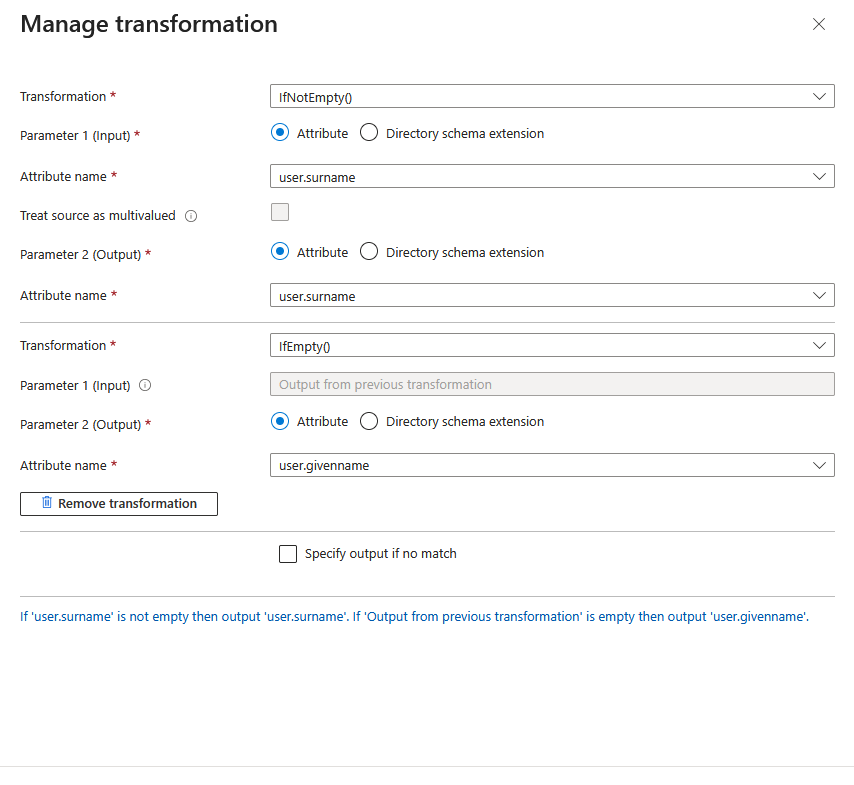
This transformation is evaluated at authentication time and does not write back to Entra ID.
Impact Assessment
Who is affected:
-
Only users authenticating to
EnrolyWebApp via SAML -
Only users whose givenName attribute is empty
What changes:
-
EnrolyWebApp receives a synthetic givenName value for single-name users
What does NOT change:
-
Entra ID user attributes
-
Other enterprise applications
-
Authentication behaviour for users with a populated givenName
Risks and Considerations
-
The givenName value provided to
Enrolythe WebApp may not represent a true first name. -
If
Enrolythe WebApp stores or reuses the attribute internally, the fallback value may persist within their system. -
This workaround compensates for a Service Provider SAML attribute mandatory requirement and should be reviewed if
EnrolyService Provider updates its SAML requirements.
This implementation should not be used as a general pattern unless explicitly required.