
Containerized Web Application Deployment on AWS or Azure Cloud
Overview
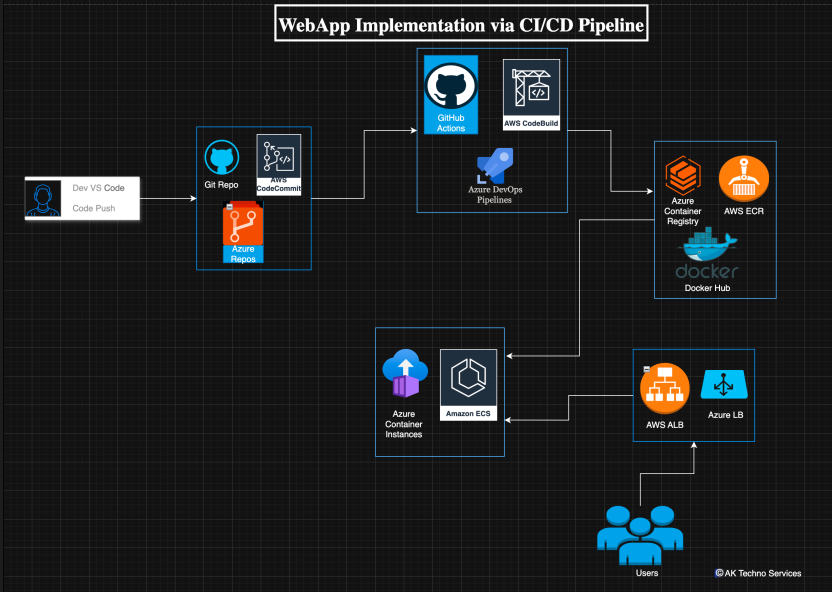
This configuration outlines a cloud-native deployment approach for containerized web applications using AWS-managed services.
The solution leverages a CI/CD pipeline to build and publish container images, which are then deployed onto a managed runtime platform behind a load balancer.
This approach ensures:
- Consistent application deliver
- Secure and scalable traffic routine
- Reduced operational overhead through automation
️ Prerequisites
- AWS account with appropriate permissions (IAM, ECS, ECR, ALB)
- Access to source code repository (e.g. GitHub)
- Containerized application (Docker-ready)
- Basic networking setup (VPC, subnets, security groups)
- Domain name (optional for external access)
Step 1: CI/CD Pipeline Integration
Configure a CI/CD pipeline (e.g. GitHub Actions (CI/CD)) to:
- Build the application container image
- Tag the image appropriately (e.g. latest, version tags)
- Push the image to a container registry (Docker Hub / AWS ECR)
This ensures all deployments originate from a controlled and repeatable process.
Step 2: Deployment Scope
Define the deployment scope:
- Single application service or multi-service architecture
- Public-facing vs internal-only service
- Environments (dev, staging, production)
Scope should be clearly defined to avoid unintended exposure.
Step 3: Target Runtime Platform
Deploy the container to a managed compute service such as:
- Amazon ECS (Fargate or EC2 launch type)
- Alternatively equivalent container runtime platforms
The runtime platform is responsible for:
- Running containers
- Managing scaling
- Handling lifecycle events
Step 4: Core Configuration
Configure:
- Task definitions (CPU, memory, container image)
- Networking (subnets, security groups)
- Service definitions (desired count, scaling policies)
Ensure:
- Least privilege networking
- Proper resource allocation
- Health checks are defined
Step 5: Access Control / Traffic Management
Implement traffic routing using:
- Application Load Balancer (ALB)
Configure:
- Listener rules (HTTP/HTTPS)
- Target groups (container services)
- TLS termination for secure access
This layer ensures:
- Secure inbound access
- Controlled routing to backend services
Step 6: Controlled Deployment Strategy
Adopt a safe rollout approach:
- Deploy new versions alongside existing ones
- Validate health checks before shifting traffic
- Use rolling updates or blue/green deployment where possible
This reduces risk during updates.
Step 7: Monitoring & Validation
Monitor the deployment using:
- CloudWatch logs and metrics
- ECS service health status
- Load balancer target health
Validate:
- Application responsiveness
- Error rates
- Resource utilisation
Step 8: Go-Live & Stability Monitoring
Once validated:
- Route full traffic to the new deployment
- Monitor system behaviour closely post-deployment
Focus on:
- Latency
- Availability
- Unexpected failures
Important Considerations
- Misconfigured security groups can expose services publicly
- Missing health checks may cause unstable deployments
- Incorrect resource sizing can lead to performance degradation
- Lack of rollback strategy increases operational risk
Best Practices
- Use Infrastructure as Code (IaC) for repeatability
- Store container images in a secure registry (ECR preferred)
- Enforce HTTPS using ALB with TLS certificates
- Implement logging and monitoring from day one
- Separate environments (dev / staging / production)
Summary
This implementation establishes a scalable and secure deployment pipeline for containerized applications using:
- GitHub Actions (CI/CD) for automation
- Docker Hub / AWS ECR for image storage
- Amazon ECS as the runtime platform
- Application Load Balancer for secure traffic routing
The approach ensures consistency, reliability, and alignment with modern cloud deployment practices.