
Microsoft 365 OAuth Email Integration Runbook (Microsoft Graph)
|
Field |
Details |
|
Document Type |
Runbook |
|
Applies To |
Microsoft 365 OAuth Email Integration Runbook (Microsoft Graph) |
|
Audience |
Entra ID & Exchange Online Admins |
|
Author |
AK. Udofeh |
|
Doc Version |
1.0 |
|
Last Updated |
June 2026 |
Design Decision Record (DDR)
| Decision | Rationale |
|---|---|
| Authentication Method | OAuth 2.0 using Microsoft Entra ID to align with Microsoft's modern authentication model. |
| Email API | Microsoft Graph SendMail API preferred over SMTP AUTH for modern SaaS integrations. |
| App Registration | Dedicated App Registration per third-party application to isolate credentials and simplify lifecycle management. |
| Mailbox Strategy | Dedicated Shared Mailboxes are preferred for service-generated emails to simplify administration and auditing. |
| Permission Model | Least privilege using Microsoft Graph Mail.Send Application permission. |
| Authentication Secret | Client Secret initially, with certificates preferred where supported by the vendor. |
| Monitoring | Exchange Message Trace, Mailbox Audit Logs, Microsoft Entra Sign-in Logs and Microsoft Purview Audit (where available). |
Solution Architecture
Third-Party Application
          │
          │ OAuth 2.0
          ▼
Microsoft Entra ID
(App Registration)
          │
Access Token
          ▼
Microsoft Graph API
(Mail.Send)
          │
          ▼
Exchange Online
          │
Shared Mailbox
          │
Recipients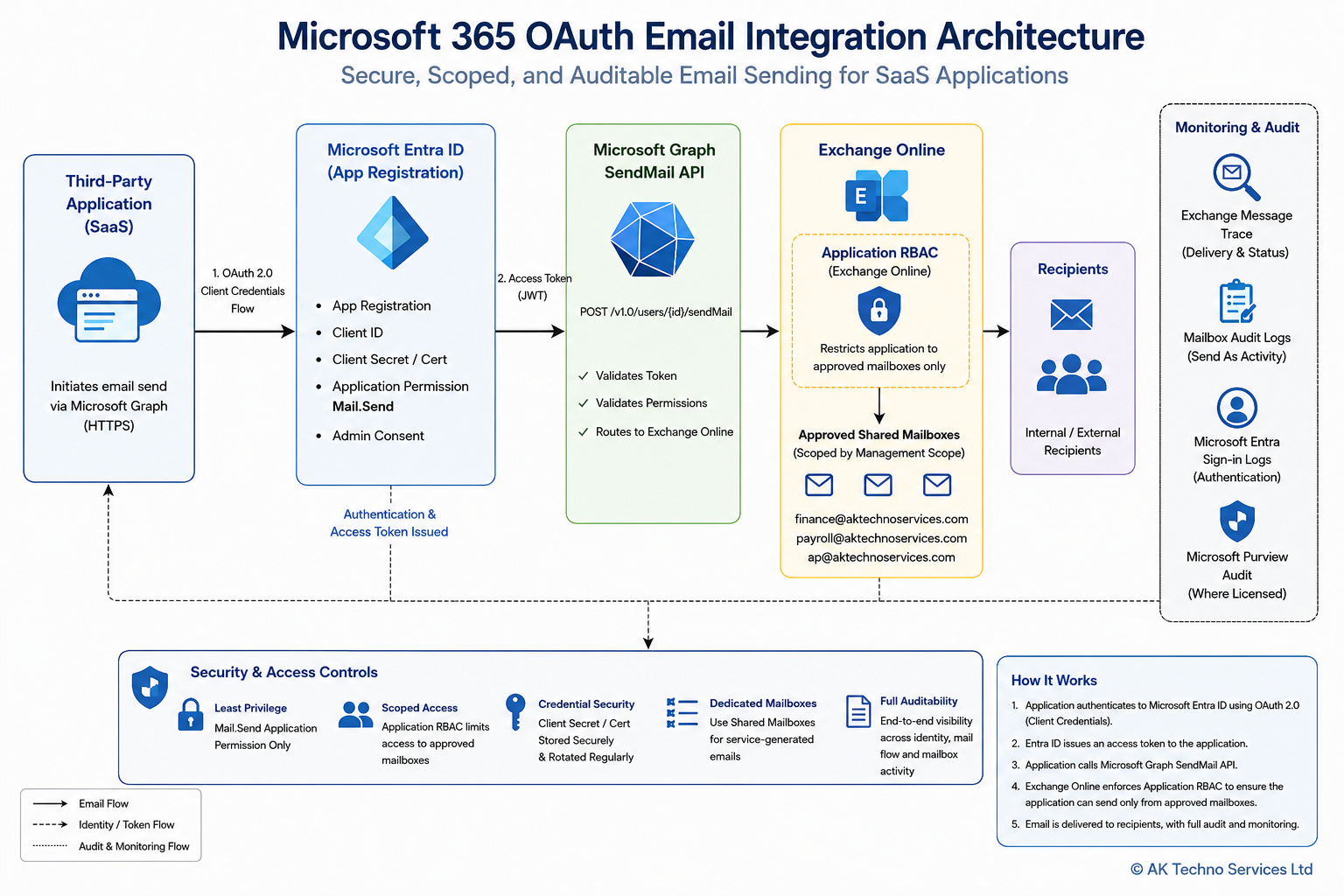
Overview
This runbook describes the standard approach for integrating third-party applications with Microsoft 365 using OAuth 2.0 and Microsoft Graph to send email through Exchange Online.
The objective is to provide a secure, repeatable and vendor-agnostic implementation that supports modern authentication while reducing administrative overhead and improving auditability.
Prerequisites
Ensure the following prerequisites have been completed:
- Microsoft 365 tenant with Exchange Online.
- Microsoft Entra ID administrator privileges.
- Exchange Administrator or Global Administrator role.
- Microsoft Graph API access.
- Dedicated App Registration.
- Dedicated Shared Mailbox(es) for application-generated email.
- Vendor confirmation that Microsoft Graph SendMail is supported.
Workflow
Step 1: Create the Microsoft Entra ID App Registration
Microsoft Entra Admin Centre
Identity > Applications > App Registrations > New Registration
Configure:
- Application Name
- Supported Account Type
- Redirect URI (if required by the application)
Record:
- Tenant ID
- Application (Client) ID
Generate a Client Secret and securely record:
- Secret Value
- Secret Expiry Date
Step 2: Configure Microsoft Graph Permissions
API Permissions
Add:
Application Permission
Mail.SendGrant:
Administrator Consent
Do not assign additional Microsoft Graph permissions unless explicitly required by the application.
Step 3: Configure Exchange Online Mailboxes
Create one or more dedicated Shared Mailboxes for application-generated email.
Examples:
- finance-notification@
- payroll-notification@
- ap-notification@
Avoid using personal user mailboxes.
Configure Exchange Online Application RBAC
To enforce the principle of least privilege, configure Exchange Online Application RBAC so that the Microsoft Entra application can only send mail using the approved Shared Mailboxes.
The recommended workflow is:
- Create the required Shared Mailboxes.
- Create an Exchange Management Scope that contains the approved mailboxes.
- Register the Microsoft Entra App Registration as an Exchange Service Principal.
- Assign the appropriate Exchange Application Role to the Service Principal.
- Validate that the application cannot send mail from mailboxes outside the defined management scope.
This configuration prevents the application from sending email as arbitrary mailboxes within the tenant, even though it has been granted the Microsoft Graph Mail.Send application permission.
Step 4: Configure the Third-Party Application
Provide the vendor with:
- Tenant ID
- Application (Client) ID
- Client Secret Value
- App Registration Name
- Approved Shared Mailbox addresses
Ensure the application is configured to use Microsoft Graph SendMail rather than SMTP where supported.
Step 5: Security Configuration
Apply the principle of least privilege.
Recommendations:
- One App Registration per application.
- One Client Secret per application.
- Shared Mailboxes for service identities.
- Secure storage of Client Secrets.
- Regular secret rotation.
- Review Graph permissions periodically.
Step 6: Testing
Validate the implementation using a non-production Shared Mailbox.
Confirm:
- OAuth authentication succeeds.
- Microsoft Graph token is issued.
- Email is delivered successfully.
- Sender address is correct.
- Message appears in Sent Items (where configured).
- External recipients receive the message.
Complete User Acceptance Testing before production deployment.
Step 7: Monitoring & Validation
Validate successful operation using:
- Exchange Message Trace
- Exchange Mailbox Audit Logs
- Microsoft Entra Sign-in Logs
- Microsoft Purview Audit (where licensed)
Investigate any authentication failures, delivery issues or unexpected mailbox activity before production rollout.
Step 8: Production Go-Live
Move to production once:
- Testing is complete.
- Security review has been approved.
- Vendor validation has been completed.
Following deployment, monitor:
- Authentication failures
- Mail delivery
- Audit logs
- Secret expiry
- Application health
Operational Maintenance
Perform the following operational tasks regularly:
- Rotate Client Secrets before expiry.
- Review Microsoft Graph permissions.
- Review mailbox access permissions.
- Monitor Exchange Message Trace.
- Review Microsoft Entra Sign-in Logs.
- Remove unused App Registrations.
- Decommission unused Shared Mailboxes.
Important Considerations
- Avoid sharing App Registrations across multiple applications.
- Do not expose Client Secret values in documentation or email.
- Validate vendor support for Microsoft Graph before implementation.
- Shared Mailboxes should be used exclusively for application-generated email where practical.
- Ensure application credentials are securely stored and rotated in accordance with organisational policy.
Best Practices
- Prefer Microsoft Graph over SMTP AUTH for new integrations.
- Create dedicated Shared Mailboxes for each business function.
- Maintain one App Registration per application.
- Use Exchange Online Application RBAC to restrict Microsoft Graph applications to approved Shared Mailboxes. Microsoft Graph
Mail.Sendalone does not restrict which Exchange Online mailboxes an application may use. Exchange Online Application RBAC should be implemented to limit the application's operational scope. - Enable auditing before production deployment.
- Document all configuration values securely.
- Perform regular operational reviews.
References
- Microsoft Graph API Documentation
- Microsoft Entra ID Documentation
- Exchange Online Administration Documentation
- Microsoft 365 Security Best Practices
Summary
This runbook provides a standardised approach for integrating third-party applications with Microsoft 365 using OAuth 2.0 and Microsoft Graph. By adopting dedicated App Registrations, Shared Mailboxes and least-privilege permissions, organisations can deliver a secure, auditable and repeatable email integration model that can be reused across multiple SaaS applications.