# Google Workspace to Exchange Online Mail Migration

<table class="MsoNormalTable" id="bkmrk-field-details-docume" title=""><tbody><tr><td>**Field**</td><td>**Details**

</td></tr><tr><td>Document Type

</td><td>Google Workspace to Exchange Online Mail Migration

</td></tr><tr><td>Applies To

</td><td>Exchange Online, Google Workspace, Google API, Google Cloud

</td></tr><tr><td>Audience

</td><td>Systems Administrator / IT Engineer

</td></tr><tr><td>Author

</td><td>AK. Udofeh

</td></tr><tr><td>Last Updated

</td><td>May 2026

</td></tr></tbody></table>

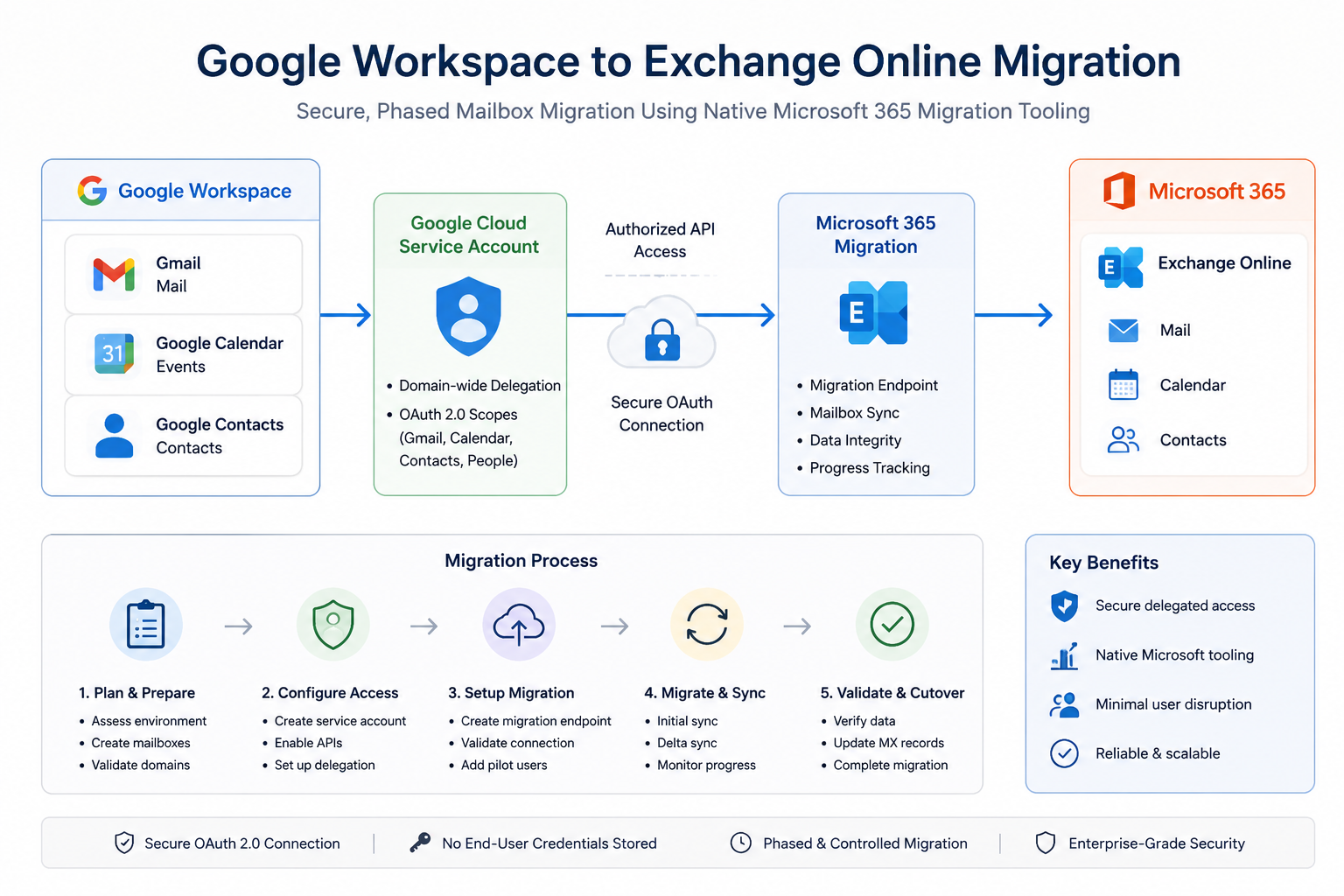
## **<span style="font-family: SimSun;">[![google-exchange migration.png](https://docs.aktechnoservices.com/uploads/images/gallery/2026-05/scaled-1680-/google-exchange-migration.png)](https://docs.aktechnoservices.com/uploads/images/gallery/2026-05/google-exchange-migration.png)</span><span style="font-family: SimSun;">Overview</span>**

This configuration enables mailbox migration from Google Workspace (Gmail) to Microsoft Exchange Online using the native migration functionality built into the Exchange Admin Center (EAC).

The migration process uses a Google Cloud service account with delegated access to securely read Gmail, Calendar, and Contacts data from Google Workspace and import it into Microsoft 365 mailboxes.

This approach is important because it:

- <span style="mso-list: Ignore;"> </span>Enables centralized migration management from Microsoft 365
- <span style="mso-list: Ignore;"> </span>Supports staged or pilot migrations
- <span style="mso-list: Ignore;"> </span>Minimises manual mailbox export/import operations
- <span style="mso-list: Ignore;"> </span>Preserves mail, calendars, and contacts during migration

The configuration mitigates risks associated with:

- <span style="mso-list: Ignore;"> </span>Manual PST exports
- <span style="mso-list: Ignore;"> </span>Incomplete mailbox migrations
- <span style="mso-list: Ignore;"> </span>Credential sharing
- <span style="mso-list: Ignore;"> </span>Unsecured mailbox access methods

##### **<span style="font-family: SimSun;">Prerequisites</span>**

##### **<span style="font-family: SimSun;">Required Licenses</span>**

##### **<span style="font-family: SimSun;">Microsoft 365</span>**

- <span style="mso-list: Ignore;"> </span>Exchange Online Plan 1 or higher
- <span style="mso-list: Ignore;"> </span>Microsoft 365 Business Premium / E3 / E5 recommended

##### **<span style="font-family: SimSun;">Google Workspace</span>**

- <span style="mso-list: Ignore;"> </span>Google Workspace Business or Enterprise subscription
- <span style="mso-list: Ignore;"> </span>Super Admin access required

##### **<span style="font-family: SimSun;">Required Roles &amp; Permissions</span>**

##### **<span style="font-family: SimSun;">Microsoft 365</span>**

The administrator performing the migration requires:

- <span style="mso-list: Ignore;"> </span>Exchange Administrator  
    or
- Global Administrator

##### **<span style="font-family: SimSun;">Google Workspace</span>**

The administrator requires:

- <span style="mso-list: Ignore;"> </span>Super Admin role

##### **<span style="font-family: SimSun;">Dependencies</span>**

The following services must be accessible:

- <span style="mso-list: Ignore;"> </span>Exchange Online
- <span style="mso-list: Ignore;"> </span>Google Workspace Admin Console
- <span style="mso-list: Ignore;"> </span>Google Cloud Console

##### **<span style="font-family: SimSun;">Preparation Tasks</span>**

Before beginning:

- Create Microsoft 365 mailboxes for all users being migrated
- Verify domains in Microsoft 365
- <span style="mso-list: Ignore;"> </span>Ensure users have Exchange Online licenses assigned
- <span style="mso-list: Ignore;"> </span>Confirm mailbox sizes and available storage
- <span style="mso-list: Ignore;"> </span>Plan migration window and user communication

##### **<span style="font-family: SimSun;">Step 1: Configure Google Cloud Service Account</span>**

##### **<span style="font-family: SimSun;">Create Google Cloud Project</span>**

Navigate to:

<span class="15">[https://console.cloud.google.com/](https://console.cloud.google.com/)</span>

Create a new project.

Example:

*<span class="15">M365Migration</span>*

##### **<span style="font-family: SimSun;">Create Service Account</span>**

Navigate to:

*<span class="15">IAM &amp; Admin → Service Accounts</span>*

Select:

*<span class="15">Create Service Account</span>*

Example service account name:

*<span class="15">exchange-migration</span>*

Select:

- Create
- Done

##### **<span style="font-family: SimSun;">Enable Domain-Wide Delegation</span>**

Open the newly created service account.

Navigate to:

*<span class="15">Details &gt; Show Domain-wide Delegation</span>*

Enable:

*<span class="15">Enable Google Workspace Domain-wide Delegation</span>*

Enter a product name:

*<span class="15">Exchange Migration</span>*

Save the configuration.

##### **<span style="font-family: SimSun;">Record the Client ID</span>**

Within the service account:

- Copy the Unique ID / Client ID
- Save it securely

This ID will later be used for delegated access configuration.

##### **<span style="font-family: SimSun;">Create JSON Key</span>**

Navigate to:

<span class="15">Keys &gt; Add Key &gt; Create New Key</span>

Select

- JSON

Download and securely store the JSON key file.

<p class="callout warning"><span style="font-family: SimSun;">Treat this file as sensitive credential material.</span></p>

##### **<span style="font-family: SimSun;">Step 2: Configure Google Workspace Delegated Access</span>**

Navigate to:

*<span class="15">Google Admin Console &gt; Security &gt; Access and Data Control &gt; API Controls</span>*

Select:

*<span class="15">Manage Domain Wide Delegation</span>*

Select:

*<span class="15">Add New</span>*

##### **<span style="font-family: SimSun;">Configure Delegated Access</span>**

##### **<span style="font-family: SimSun;">Client ID</span>**

Paste the service account Client ID copied earlier.

##### **<span style="font-family: SimSun;">OAuth Scopes</span>**

Enter the following scopes exactly as shown:

*<span class="15">https://mail.google.com/,https://www.googleapis.com/auth/calendar,https://www.google.com/m8/feeds/,https://www.googleapis.com/auth/gmail.settings.sharing,https://www.googleapis.com/auth/contacts</span>*

<p class="callout warning"><span style="font-family: SimSun;">Important:</span></p>

- Do not add spaces
- Use comma-separated format only
- Incorrect scopes will cause migration failures later

Select:

*<span class="15">Authorize</span>*

##### **<span style="font-family: SimSun;">Step 3 — Enable Required Google APIs</span>**

In the Project page, navigate to:

[https://console.cloud.google.com/apis/library](https://console.cloud.google.com/apis/library)

Ensure the correct migration project is selected.

Click Enable API Services and enable the following APIs:

<table border="1" id="bkmrk-api-required-gmail-a" style="border-collapse: collapse; width: 41.6667%; height: 280px;"><colgroup><col style="width: 53.8338%;"></col><col style="width: 46.1662%;"></col></colgroup><tbody><tr><td valign="center">**API**

</td><td valign="center">**Required**

</td></tr><tr><td valign="center">Gmail API

</td><td valign="center">Yes

</td></tr><tr><td valign="center">Google Calendar API

</td><td valign="center">Yes

</td></tr><tr><td valign="center">Contacts API

</td><td valign="center">Yes

</td></tr><tr><td valign="center">People API

</td><td valign="center">Yes

</td></tr></tbody></table>

##### **<span style="font-family: SimSun;">Step 4: Configure Migration Endpoint in Exchange Online</span>**

Navigate to:

<span class="15">Exch*ange Admin Center &gt; Migration*</span>

Select:

*<span class="15">Add Migration Batch</span>*

##### **<span style="font-family: SimSun;">Migration Path</span>**

Choose:

*<span class="15">Google Workspace (Gmail)</span>*

##### **<span style="font-family: SimSun;">Migration Endpoint Configuration</span>**

##### **<span style="font-family: SimSun;">Email Address</span>**

Enter a Google Workspace Super Admin account.

Example:

*<span class="15">admin@company.com</span>*

<p class="callout warning"><span style="font-family: SimSun;">Do not use the service account email address.</span></p>

##### **<span style="font-family: SimSun;">JSON Key File</span>**

Upload the downloaded JSON key file created earlier.

##### **<span style="font-family: SimSun;">Verification</span>**

If endpoint validation repeatedly fails:

- Enable Skip Verification
- Continue with pilot migration testing

<p class="callout info"><span style="font-family: SimSun;">Google propagation delays may cause temporary validation failures.</span></p>

##### **<span style="font-family: SimSun;">Step 5: Access Control / Enforcement</span>**

##### **<span style="font-family: SimSun;">Recommended Migration Scope</span>**

For production safety:

- <span style="mso-list: Ignore;"><span style="font: 7.0pt Times New Roman;"> </span></span>Begin with pilot users only
- <span style="mso-list: Ignore;"><span style="font: 7.0pt Times New Roman;"> </span></span>Avoid immediate tenant-wide migration

Recommended pilot group:

- IT administrators
- <span style="mso-list: Ignore;"><span style="font: 7.0pt Times New Roman;"> </span></span>Test users
- <span style="mso-list: Ignore;"> </span>Low-risk business users

##### **<span style="font-family: SimSun;">Recommended Mail Flow Strategy</span>**

During migration:

- Keep Google Workspace as primary mail delivery platform
- <span style="mso-list: Ignore;"> </span>Do not switch MX records immediately

Switch MX records only after:

- <span style="mso-list: Ignore;"> </span>Mailbox validation
- <span style="mso-list: Ignore;"> </span>User acceptance testing
- <span style="mso-list: Ignore;"> </span>Successful pilot migration completion

##### **<span style="font-family: SimSun;">Step 6: Testing / Report Mode</span>**

##### **<span style="font-family: SimSun;">Recommended Pilot Migration Process</span>**

Migrate:

- <span style="mso-list: Ignore;"><span style="font: 7.0pt Times New Roman;"> </span></span>One mailbox initially
- <span style="mso-list: Ignore;"><span style="font: 7.0pt Times New Roman;"> </span></span>Validate data integrity
- <span style="mso-list: Ignore;"> </span>Confirm permissions and access

##### **<span style="font-family: SimSun;">Validate Migrated Data</span>**

Confirm:

- <span style="mso-list: Ignore;"> </span>Emails migrated successfully
- <span style="mso-list: Ignore;"><span style="font: 7.0pt Times New Roman;"> </span></span>Folder structure preserved
- <span style="mso-list: Ignore;"><span style="font: 7.0pt Times New Roman;"> </span></span>Calendar items imported
- <span style="mso-list: Ignore;"><span style="font: 7.0pt Times New Roman;"> </span></span>Contacts available
- <span style="mso-list: Ignore;"><span style="font: 7.0pt Times New Roman;"> </span></span>Outlook access functional

**<span style="font-family: SimSun;">User Validation</span>**

Perform:

- <span style="mso-list: Ignore;"><span style="font: 7.0pt Times New Roman;"> </span></span>Outlook sign-in testing
- <span style="mso-list: Ignore;"><span style="font: 7.0pt Times New Roman;"> </span></span>OWA testing
- Mobile device testing

##### **<span style="font-family: SimSun;">Step 7: Monitoring &amp; Validation</span>**

##### **<span style="font-family: SimSun;">Exchange Online Monitoring</span>**

Navigate to:

<span class="15">Exchange Admin Center &gt; Migration</span>

Monitor:

- <span style="mso-list: Ignore;"> </span>Batch status
- <span style="mso-list: Ignore;"><span style="font: 7.0pt Times New Roman;"> </span></span>Sync progress
- <span style="mso-list: Ignore;"> </span>Failed items
- <span style="mso-list: Ignore;"><span style="font: 7.0pt Times New Roman;"> </span></span>Skipped items

##### **<span style="font-family: SimSun;">Google Workspace Validation</span>**

Validate:

- <span style="mso-list: Ignore;"><span style="font: 7.0pt Times New Roman;"> </span></span>API access remains active
- <span style="mso-list: Ignore;"><span style="font: 7.0pt Times New Roman;"> </span></span>Service account remains enabled
- <span style="mso-list: Ignore;"><span style="font: 7.0pt Times New Roman;"> </span></span>Delegation settings remain configured

##### **<span style="font-family: SimSun;">Common Issues to Monitor</span>**

<table border="1" id="bkmrk-issue-likely-cause-e" style="border-collapse: collapse; width: 55.3571%;"><colgroup><col style="width: 46.1411%;"></col><col style="width: 53.8589%;"></col></colgroup><tbody><tr><td valign="center">**Issue**

</td><td valign="center">**Likely Cause**

</td></tr><tr><td valign="center">Endpoint validation failure

</td><td valign="center">Propagation delay

</td></tr><tr><td valign="center">Authentication failure

</td><td valign="center">Incorrect OAuth scopes

</td></tr><tr><td valign="center">Mailbox sync failure

</td><td valign="center">API not enabled

</td></tr><tr><td valign="center">Permission denied

</td><td valign="center">Delegation not configured

</td></tr><tr><td valign="center">Rate limiting

</td><td valign="center">Excessive retry attempts

</td></tr></tbody></table>

##### **<span style="font-family: SimSun;">Step 8: Enforcement / Go-Live</span>**

Once migration validation is complete:

##### **<span style="font-family: SimSun;">Finalize Migration</span>**

Complete:

- Final synchronization
- User sign-off
- <span style="mso-list: Ignore;"> </span>Mail flow cutover

##### **<span style="font-family: SimSun;">Update MX Records</span>**

Point MX records to Microsoft 365.

Example Microsoft MX target:

*<span class="15">&lt;tenant&gt;.mail.protection.outlook.com</span>*

##### **<span style="font-family: SimSun;">Post-Cutover Tasks</span>**

Perform:

- <span style="mso-list: Ignore;"><span style="font: 7.0pt Times New Roman;"> </span></span>Outlook profile validation
- <span style="mso-list: Ignore;"><span style="font: 7.0pt Times New Roman;"> </span></span>Mobile device reconfiguration
- <span style="mso-list: Ignore;"><span style="font: 7.0pt Times New Roman;"> </span></span>DNS validation
- <span style="mso-list: Ignore;"><span style="font: 7.0pt Times New Roman;"> </span></span>Mail flow testing

##### **<span style="font-family: SimSun;">Important Considerations</span>**

##### **<span style="font-family: SimSun;">Propagation Delays</span>**

Google delegation and API changes may take:

- 15 minutes to 24 hours

Temporary failures during this period are expected.

##### **<span style="font-family: SimSun;">Service Account Security</span>**

The JSON key file provides privileged access.

Recommendations:

- <span style="mso-list: Ignore;"> </span>Store securely
- <span style="mso-list: Ignore;"> </span>Restrict administrator access
- <span style="mso-list: Ignore;"><span style="font: 7.0pt Times New Roman;"> </span></span>Delete unused keys after migration

##### **<span style="font-family: SimSun;">Verification Failures</span>**

Microsoft endpoint verification may intermittently fail even when configuration is correct.

Where necessary:

- <span style="mso-list: Ignore;"><span style="font: 7.0pt Times New Roman;"> </span><span style="font: 7.0pt Times New Roman;"> </span></span>Use Skip Verification
- <span style="mso-list: Ignore;"> </span>Validate with pilot migrations

##### **<span style="font-family: SimSun;">Large Mailboxes</span>**

Large Gmail mailboxes may:

- <span style="mso-list: Ignore;"><span style="font: 7.0pt Times New Roman;"> </span></span>Take several hours
- <span style="mso-list: Ignore;"><span style="font: 7.0pt Times New Roman;"> </span></span>Experience throttling
- <span style="mso-list: Ignore;"><span style="font: 7.0pt Times New Roman;"> </span></span>Require staged synchronization

##### **<span style="font-family: SimSun;">Best Practices</span>**

##### **<span style="font-family: SimSun;">Security Recommendations</span>**

- <span style="mso-list: Ignore;"> </span>Use dedicated migration admin accounts
- <span style="mso-list: Ignore;"><span style="font: 7.0pt Times New Roman;"> </span><span style="font: 7.0pt Times New Roman;"> </span></span>Restrict service account access
- <span style="mso-list: Ignore;"><span style="font: 7.0pt Times New Roman;"> </span></span>Remove unused delegation after migration completion
- <span style="mso-list: Ignore;"><span style="font: 7.0pt Times New Roman;"> </span></span>Rotate or delete JSON keys post-migration

##### **<span style="font-family: SimSun;">Operational Recommendations</span>**

- <span style="mso-list: Ignore;"><span style="font: 7.0pt Times New Roman;"> </span></span>Start with pilot users
- <span style="mso-list: Ignore;"><span style="font: 7.0pt Times New Roman;"> </span></span>Avoid weekend cutovers without validation
- <span style="mso-list: Ignore;"><span style="font: 7.0pt Times New Roman;"> </span></span>Maintain rollback capability during migration
- <span style="mso-list: Ignore;"><span style="font: 7.0pt Times New Roman;"> </span></span>Document all DNS changes

##### **<span style="font-family: SimSun;">Migration Recommendations</span>**

- <span style="mso-list: Ignore;"><span style="font: 7.0pt Times New Roman;"> </span></span>Migrate mailboxes in batches
- <span style="mso-list: Ignore;"><span style="font: 7.0pt Times New Roman;"> </span></span>Validate each batch before proceeding
- <span style="mso-list: Ignore;"><span style="font: 7.0pt Times New Roman;"> </span></span>Communicate migration timelines clearly to users

##### **<span style="font-family: SimSun;">Summary</span>**

This implementation configured secure mailbox migration from Google Workspace to Exchange Online using Microsoft’s built-in Google Workspace migration functionality.

The process included:

- <span style="mso-list: Ignore;"><span style="font: 7.0pt Times New Roman;"> </span></span>Google Cloud service account creation
- API enablement
- <span style="mso-list: Ignore;"><span style="font: 7.0pt Times New Roman;"> </span></span>Domain-wide delegation
- <span style="mso-list: Ignore;"><span style="font: 7.0pt Times New Roman;"> </span></span>Exchange Online migration endpoint configuration
- <span style="mso-list: Ignore;"><span style="font: 7.0pt Times New Roman;"> </span></span>Pilot migration validation
- <span style="mso-list: Ignore;"><span style="font: 7.0pt Times New Roman;"> </span></span>Controlled production rollout

Following this approach provides a secure, enterprise-ready migration process while minimising disruption, authentication issues, and mailbox migration failures.